Employees and reemployed retirees can only be enrolled electronically through eSERS, SERS’ secure site designated for employers. eSERS provides an effective, time-saving way to submit employee information online.
Employers are responsible for the timely and accurate submission of enrollment information.
All new employees must be enrolled in SERS. An individual’s account is established only when the documentation is accepted by SERS.
Employers will not be able to submit contribution reporting for the individual until an enrollment is uploaded or manually entered into eSERS.
New employees and reemployed retirees are enrolled using either the:
All new employees also must complete a federal form, SSA-1945.
If an employer is not registered with eSERS, contact the Employer Web Administrator (EWA) for the school district.
The EWA will be able to grant access to eSERS.
For more information, call Employer Services at 877-213-0861 or email at employerservices@ohsers.org.
To check if an employee has been enrolled in SERS, go to the Employer Reporting Detail Lookup application on eSERS.
Search by the employee’s:
If the employee has already been entered, the enrollment will appear in the “Search Results” panel. If the employee’s enrollment information does not populate, double check the Social Security number.
If correct, enroll the new employee.
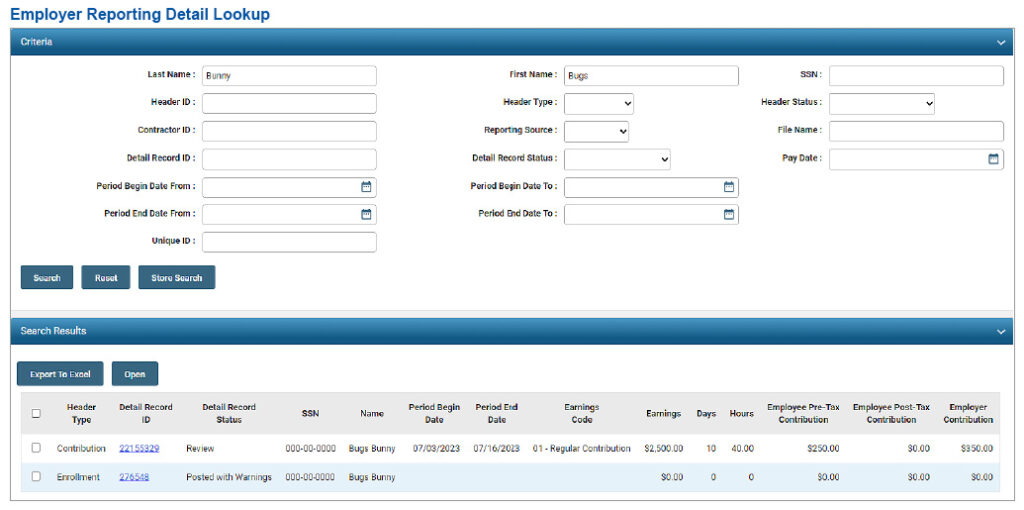
The above example is an employee search by first and last name. The employer is able to see that the Social Security numbers are transposed, and a correction needs to be made.
If the employer notices that a member enrollment has been entered into eSERS incorrectly, do not enter a new enrollment. Instead, contact Employer Services for assistance.
Federal regulations require employers to submit a Statement Concerning Your Employment in a Job Not Covered by Social Security Form (SSA-1945). It explains how public employment may affect Social Security benefits.
Employers must submit a copy to SERS once it has been signed by the employee.
The SSA-1945 Form can be:
Due to security reasons, do not email the form to Employer Services.
If you have questions about your employer responsibilities or need assistance with eSERS, contact Employer Services at 877-213-0861.