The Contribution Report is the employer’s responsibility. It details the employees for whom you report and remit contributions.
Employee and employer contributions must be remitted to SERS no later than five business days from the pay date, which is based on the employer’s pay schedule.
Penalties will be assessed for late reports.
Contribution Reports must be submitted through eSERS using either the:
Once the report has been uploaded and processed, the employer will receive a message on the Message Board in eSERS. It indicates if the report has been successfully processed and posted, or processed with errors and warnings.
The message will state either the:
“Uploaded file was successfully processed and posted”
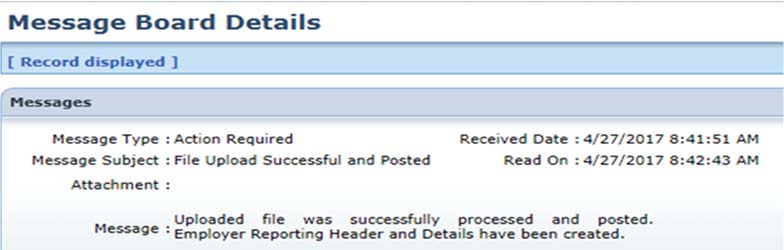
or
“Uploaded file was successfully processed with either error or warnings”
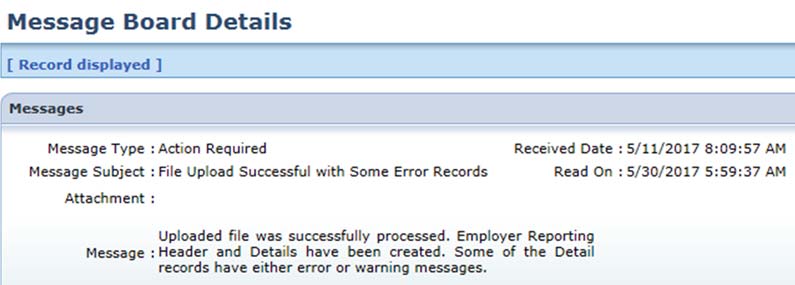
If the file is processed with errors or warnings, the employer needs to correct the issues identified on the Contribution File Correction and Manual Contribution Entry application in eSERS.
Once all records are valid, the employer will be able to resubmit the file for posting.
For detailed instructions on correcting and resubmitting reports, refer to the eSERS Guide.
To submit a Contribution Report, employers need the:
If contributions are post-tax, the amount must be entered in the Employee Post-Tax Contribution field.
If contributions are covered by an authorized and accepted employer Pick-up Plan as pre-taxed, the amount is placed in the Employee Pre-Tax Contribution field.
Employers should verify with contract companies if contributions are pre-tax or post-tax.
A day is defined as any part of a day for which an employee is paid, for work or paid time off. This includes:
When reporting:
Exception: Coaches and Supplemental Employees
If using the same pay date in eSERS, there is a Supplemental Earnings Code for coaches or supplemental employees that allows their contributions to be reported on a regular payroll report with extra days and hours.
If you have questions about your employer responsibilities or need assistance with eSERS, contact Employer Services at 877-213-0861.